제가 테스트 하는 유니티 버전은 Unity 6(버전 6000.0.64f1) 버전입니다.
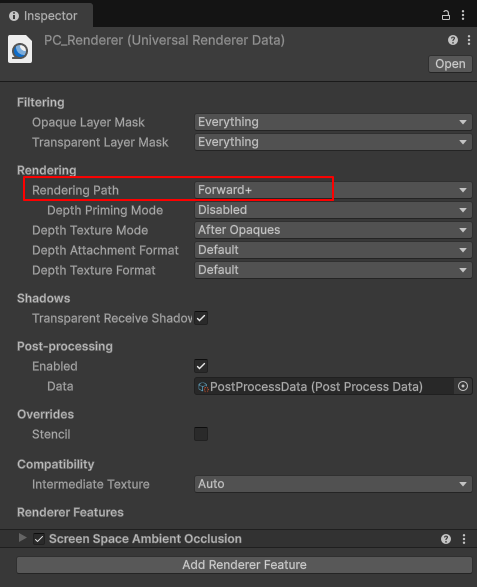
Project > Settings > PC_Renderer를 보면 Rendering Path를 "Forward+"로 설정 했습니다.
3개의 Point Light와 1개의 Spot Light를 배치하면 라이트 갯수가 1개 이상 넘어와야 한는데
계속 0개로 넘어 왔습니다.
GetAdditionalLightsCount() 코드 내부를 따라가 보면 코드가 다음과 같이 되어 있습니다.
int GetAdditionalLightsCount()
{
#if USE_FORWARD_PLUS
// Counting the number of lights in clustered requires traversing the bit list, and is not needed up front.
return 0;
#else
// TODO: we need to expose in SRP api an ability for the pipeline cap the amount of lights
// in the culling. This way we could do the loop branch with an uniform
// This would be helpful to support baking exceeding lights in SH as well
return int(min(_AdditionalLightsCount.x, unity_LightData.y));
#endif
}
{
#if USE_FORWARD_PLUS
// Counting the number of lights in clustered requires traversing the bit list, and is not needed up front.
return 0;
#else
// TODO: we need to expose in SRP api an ability for the pipeline cap the amount of lights
// in the culling. This way we could do the loop branch with an uniform
// This would be helpful to support baking exceeding lights in SH as well
return int(min(_AdditionalLightsCount.x, unity_LightData.y));
#endif
}
UniversalForward+에서 라이트의 갯수를 구하는 예는 다음과 같습니다.
Shader "Custom/ForwardPlusLightCountDebug"
{
SubShader
{
Tags { "RenderType"="Opaque" "UniversalPipeline"="true" }
Pass
{
Name "UniversalForward"
Tags { "LightMode"="UniversalForward" }
HLSLPROGRAM
#pragma vertex vert
#pragma fragment frag
#pragma multi_compile _ _ADDITIONAL_LIGHTS
#pragma multi_compile _ _FORWARD_PLUS
#include "Packages/com.unity.render-pipelines.universal/ShaderLibrary/Core.hlsl"
#include "Packages/com.unity.render-pipelines.universal/ShaderLibrary/Lighting.hlsl"
struct Attributes {
float4 positionOS : POSITION;
};
struct Varyings {
float4 positionCS : SV_POSITION;
float3 positionWS : TEXCOORD0;
};
Varyings vert(Attributes IN)
{
Varyings OUT;
OUT.positionCS = TransformObjectToHClip(IN.positionOS.xyz);
OUT.positionWS = TransformObjectToWorld(IN.positionOS.xyz);
return OUT;
}
half4 frag(Varyings IN) : SV_Target
{
uint lightCount = 0;
#if defined(_FORWARD_PLUS)
// 1. Unity 6(버전 6000.0.64f1) 매크로가 내부적으로 참조하는 inputData 구조체를 생성합니다.
InputData inputData = (InputData)0;
// 2. 화면 좌표(UV)를 계산하여 넣어줍니다. (Forward+ 인덱싱에 필수)
float4 screenPos = ComputeScreenPos(IN.positionCS);
inputData.normalizedScreenSpaceUV = screenPos.xy / screenPos.w;
inputData.positionWS = IN.positionWS;
// 3. 이제 매크로가 inputData를 찾아 정상 작동합니다.
LIGHT_LOOP_BEGIN(IN.positionCS.xy)
{
lightCount++;
}
LIGHT_LOOP_END
#else
lightCount = GetAdditionalLightsCount();
#endif
// 라이트 개수 시각화
if (lightCount >= 2) return half4(1, 0, 0, 1); // 빨강
if (lightCount == 1) return half4(0, 0, 1, 1); // 파랑
return half4(0.2, 0.2, 0.2, 1); // 회색
}
ENDHLSL
}
}
}
{
SubShader
{
Tags { "RenderType"="Opaque" "UniversalPipeline"="true" }
Pass
{
Name "UniversalForward"
Tags { "LightMode"="UniversalForward" }
HLSLPROGRAM
#pragma vertex vert
#pragma fragment frag
#pragma multi_compile _ _ADDITIONAL_LIGHTS
#pragma multi_compile _ _FORWARD_PLUS
#include "Packages/com.unity.render-pipelines.universal/ShaderLibrary/Core.hlsl"
#include "Packages/com.unity.render-pipelines.universal/ShaderLibrary/Lighting.hlsl"
struct Attributes {
float4 positionOS : POSITION;
};
struct Varyings {
float4 positionCS : SV_POSITION;
float3 positionWS : TEXCOORD0;
};
Varyings vert(Attributes IN)
{
Varyings OUT;
OUT.positionCS = TransformObjectToHClip(IN.positionOS.xyz);
OUT.positionWS = TransformObjectToWorld(IN.positionOS.xyz);
return OUT;
}
half4 frag(Varyings IN) : SV_Target
{
uint lightCount = 0;
#if defined(_FORWARD_PLUS)
// 1. Unity 6(버전 6000.0.64f1) 매크로가 내부적으로 참조하는 inputData 구조체를 생성합니다.
InputData inputData = (InputData)0;
// 2. 화면 좌표(UV)를 계산하여 넣어줍니다. (Forward+ 인덱싱에 필수)
float4 screenPos = ComputeScreenPos(IN.positionCS);
inputData.normalizedScreenSpaceUV = screenPos.xy / screenPos.w;
inputData.positionWS = IN.positionWS;
// 3. 이제 매크로가 inputData를 찾아 정상 작동합니다.
LIGHT_LOOP_BEGIN(IN.positionCS.xy)
{
lightCount++;
}
LIGHT_LOOP_END
#else
lightCount = GetAdditionalLightsCount();
#endif
// 라이트 개수 시각화
if (lightCount >= 2) return half4(1, 0, 0, 1); // 빨강
if (lightCount == 1) return half4(0, 0, 1, 1); // 파랑
return half4(0.2, 0.2, 0.2, 1); // 회색
}
ENDHLSL
}
}
}
렌더링 패스를 UniversalForward+로 설정하려면 다음과 같이 추가 합니다.
1.
Name "UniversalForward"
Tags { "LightMode"="UniversalForward" }
2.
#pragma multi_compile _ _ADDITIONAL_LIGHTS
#pragma multi_compile _ _FORWARD_PLUS
3.
// 1. Unity 6(버전 6000.0.64f1) 매크로가 내부적으로 참조하는 inputData 구조체를 생성합니다.
InputData inputData = (InputData)0;
// 2. 화면 좌표(UV)를 계산하여 넣어줍니다. (Forward+ 인덱싱에 필수)
float4 screenPos = ComputeScreenPos(IN.positionCS);
inputData.normalizedScreenSpaceUV = screenPos.xy / screenPos.w;
inputData.positionWS = IN.positionWS;
// 3. 이제 매크로가 inputData를 찾아 정상 작동합니다.
LIGHT_LOOP_BEGIN(IN.positionCS.xy)
{
lightCount++;
}
LIGHT_LOOP_END
코드의 핵심 포인터는 다음과 같습니다.
1. Forward+ 모드와 LIGHT_LOOP_BEGIN
기존의 Forward 방식은 모든 조명을 루프 돌며 하나씩 계산했지만, Forward+는 화면을 타일(Tile)이나 클러스터(Cluster) 단위로 나누어 해당 영역에 영향을 주는 조명 목록을 미리 계산합니다._FORWARD_PLUS 키워드: 이 키워드는 프로젝트의 Render Pipeline Asset에서 'Forward+'가 활성화되었을 때 활성화됩니다.
LIGHT_LOOP_BEGIN(pixelPos): Unity 6의 최신 API입니다. 특정 픽셀 위치(IN.positionCS.xy)를 기준으로 그 영역에 할당된 조명 리스트를 가져와 루프를 시작합니다.
Unity 6의 LIGHT_LOOP_BEGIN 매크로는 내부적으로 다음과 같은 과정을 거칩니다:
- 입력받은 좌표(IN.positionCS.xy)를 사용해 현재 픽셀이 속한 타일 인덱스를 계산합니다.
- 해당 타일에 등록된 라이트들의 비트 리스트를 가져옵니다.
- 그 리스트를 기반으로 반복문(for-loop)을 실행합니다.
2. InputData 구조체가 필요한 이유
유니티 내부의 조명 계산 함수(Lighting.hlsl 등)들은 InputData라는 구조체를 참조하도록 설계되어 있습니다.InputData 내부의 normalizedScreenSpaceUV는 Forward+가 현재 어떤 타일의 조명 데이터를 가져올지 결정하는 인덱스 역할을 합니다.
따라서 InputData inputData = (InputData)0;으로 초기화한 뒤, 화면 좌표(UV)를 직접 계산해서 넣어주어야 매크로가 정상적으로 동작합니다.
3. 주요 코드 로직 분석
ComputeScreenPos: 클립 공간의 좌표를 화면 공간의 좌표로 변환합니다. 이를 통해 현재 픽셀이 화면의 어느 위치(0~1 사이의 값)에 있는지 알 수 있습니다.lightCount++: 루프가 실행될 때마다 카운트를 올려, 해당 픽셀에 영향을 주는 추가 광원(Additional Lights)의 개수를 셉니다.
#else (Standard Forward): Forward+가 아닐 때는 유니티의 기본 함수인 GetAdditionalLightsCount()를 사용하여 간단하게 개수를 가져옵니다.